Total Video converter 3.12  

Posted by sach in

Total Video converter 3.12

Image

Image

Quote:
-Convert all video files to 3gp,mp4,psp,iPod,iPhone,flv,dvd,vcd,...

Total Video Converter is a complete solution for video conversion which supports reading, playing all kinds of video and audio formats and converting them to the popular video formats. Total Video Converter includes a powerful media conversion engine internally so that you can convert media files with very fast speed.

Main Features:
# Convert all kinds of videos to mobile videos or audios (mp4, 3gp, xvid, divx mpeg4 avi, amr audio) which are used by cell-phone, PDA, PSP, iPod;
# Photos slide show combines multi-photos and musics with more than 300 photos fantasy transition effect;
# High compatibility and high efficiency for Importing RMVB or RM video/audio;
# Convert various videos to MPEG videos compatible with standard DVD/SVCD/VCD;
# Burn the converted videos to DVD/SVCD/VCD;
# Rip DVD to popular videos of all sorts;
# Extract audio from various of videos and convert which to all kinds of audios (mp3, ac3, ogg, wav, aac);
# RIP CD to audios of all sorts directly;


Support All popular video and audio formats:
avi,dat,3gp,qt,mov,mpg,mpeg,m1v,wmv,asf,ogm,mkv,dsm,vob,mp4,ra,rm,ram,amr, 3gp,3gp2,3g2,3gpp,psp,flv,fli,flc,rmvb,rpm,gif,ifo,mp3,ac3,wav,aac,aiff,au,cda,m
p2

Total Video Converter supports generating the following file formats:

Output Video Formats:
. MPEG4(.mp4)
. 3gp(.3gp, 3g2)
. Game Psp(.psp)
. MPEG1(.mpg, mpeg)
. NTSC, PAL DVD mpeg
. NTSC, PAL SVCD mpeg
. NTSC, PAL VCD mpeg
. Ms Mpeg4 AVI(.avi)
. Divx AVI(.avi)
. Xvid AVI(.avi)
. H264 AVI(.avi)
. Mjpeg AVI(.avi)
. HuffYUV AVI(.avi)
. Swf Video(.swf)
. Flv Video (.flv)
. Gif Animation(.gif)
. Mpeg4 Mov(.mov)
. Apple Quicktime(.mov)
. FLIC format(.fli, .flc)
. Gif Animation(.gif)
. DV (.dv)

Outpu Audio Formats:
. mp3, mp2
. wav
. aac
. ogg
. amr
. awb
. m4a

Requirements: Directx 9

CLICK HERE

Total Commander Ultima Prime 4.1 Full  

Posted by sach in

Total Commander Ultima Prime 4.1 Full


Click this bar to view the full image.


This image has been resized. Click this bar to view the full image. The original image is sized 600x393.


This image has been resized. Click this bar to view the full image. The original image is sized 600x394.


Click this bar to view the full image.


Just select the desired mp3 and click on "F3 View" and a small cool AIMP2 mp3 player starts:

Click this bar to view the full image.


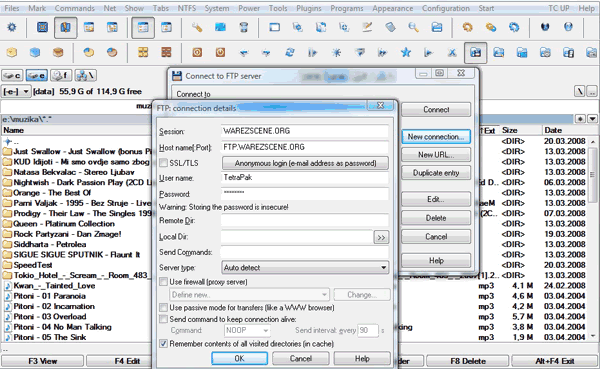
You don't need FTP client anymore, you can do everything with TCUP, secure, fast, simple:

This image has been resized. Click this bar to view the full image. The original image is sized 600x369.


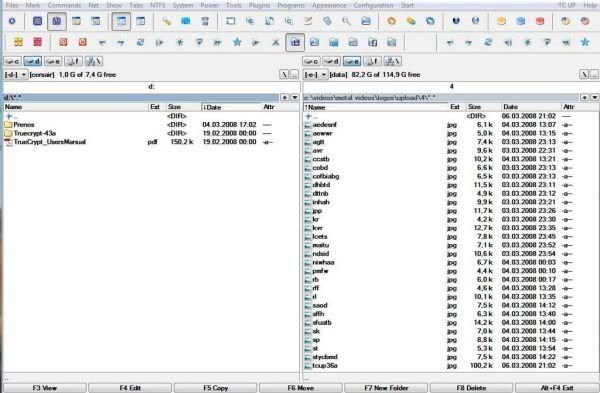
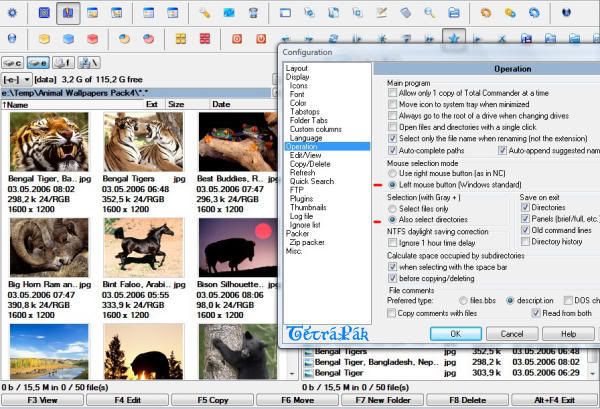
And many many more... Try it out, fantastic windows explorer and manager all in one. Highly Recommended!


What is Total Commander Ultima Prime?

This is an extended version of Total Commander.
Total Commander Ultima Prime is a collection of the software and customized settings sets gathered in one installation package for enhancing Total Commander (file manager) possibilities.
It contains extended main menu and toolbar, other programs, numerous plugins, changed layout and other elements.

Version 4 gives installer code changes: users can define files extensions associations for internal programs; Project gained excellent software called Unlocker, which helps deleting files locked by Windows; "Tools" menu now contains applications bundled with AIMP player (Advanced Tag Editor, Audio Converter, Audio Recorder); "Thumbnails view" mode gives additional files information and shows images not handled by WLX plugins; Few applications have been updated and known bugs have been fixed.


New version - Total Commander Ultima Prime 4.1
2008-07-31 23:59:59

Continuing fourth TC UP edition goals (better system integration), the newest version gives the possibility to create shortcuts for included application.
It can simply be be achieved during the installation procedure.

Ant Movie Catalog application has been included into project, which allows to manage users movies collections.

Few applications (Total Commander 7.04, AIMP 2.50.270 RC3, Artweaver 0.5.3, Miranda IM 0.8.0 alpha build #18 Unicode, Notepad++ 5.0.2, System Info for Windows Build 2008-07-20, The KMPlayer 2.9.3.1432, uTorrent 1.8 RC6 build 11564, VirtualDub 1.8.3, XnView 1.94.1) and plugins have been updated to the newest versions.

Also all known bugs have been fixed.


Version 4.1 (2008 07 31)

Added movies catalogging application called "Ant Movie Catalog" - thanks to Antoine Potten for agreement to include it into project.

Added the possibility to create TC UP Programs shortcuts during installation procedure.

"Total Commander" has been updated to the newest version (7.04)

"AIMP" has been updated to the newest version (2.50.270 RC3).

"Artweaver" has been updated to the newest version (0.5.3).

"Miranda IM" has been updated to the newest version (0.8.0 alpha build #18 Unicode).

"Notepad++" has been updated to the newest version (5.0.2).

"System Info for Windows" has been updated to the newest version (Build 2008-07-20).

"The KMPlayer" has been updated to the newest version (2.9.3.1432).

"uTorrent" has been updated to the newest version (1.8 RC6 build 11564).

"VirtualDub" has been updated to the newest version (1.8.3).

"XnView" has been updated to the newest version (1.94.1).

"TC UP New" tool update to the newest version (2.0 beta 1).

Various plugins have been updated.

Known bugs has been corrected.


Here is a tip for users of Total Commander Ultima Prime.

Want to see in status bar the current folder size and number of files and directories?
Do this:
Close Total Commander Ultima Prime.
Edit with Notepad the file wincmd.ini (c:\Program Files\TC UP\wincmd.ini) and change LongInStatus=1 to LongInStatus=0
Save the file and close, now run Total Commander Ultima Prime and voila now you see the useful info in status bar.

Another quick tip: when you want to see the size of a folder (without enter into it or click properties) just select the folder and press space on keyboard.

Cheers, TetraPak

CLICK HERE

pass:
thephoenix-forums.com

Winamp 5.54 Build 2145  

Posted by sach in

Winamp 5.54 Build 2145

A flexible and sophisticated application for playing and managing your music
Winamp is more than just a player. It's your window to the multimedia world. From MP3s to streaming video, Winamp is the one place you go to feed your audio/video habit.

Here are some key features of "Winamp 5":

· Winamp can use both Modern and Classic skins, so you can be both hip and retro at the same time.
· Winamp gives you easy and organized access to your favorite media. That's what you call mass media
· Winamp can play a huge variety of audio and video formats right out of the box... err... out of the installation.
· You get access to hundreds of free audio and video channels in the Media Library. This ain't your father's library.
· Winamp can burn your music to CDs.
· Winamp makes it easy to create and manage your favorite songs through playlists. Yes, you can be your own DJ.
· Winamp allows you to extend it's functionality through the use of "plug-ins" Its like the Mr. Potato Head of music.
· Winamp will allow you to alter the sound of your music through a built-in Equalizer. An audio receiver right on your PC.
· Winamp allows you to watch visual effects that are driven from your music with Visualizations. From flaming fireballs to screaming strobe effects, its all there.

Winamp Main Window
· Winamp 5 features our new Modern Skin that's easier to use and more powerful than ever
· Easily access the Media Library (ML), Playlist Editor (PL), integrated Video
or Visualizations (Video/Vis Drawer), or the EQ, Skin Options, and Color Themes (Config Drawer) from the Main Window
· Includes over 50 color themes that suit nearly every mood or occasion!
· Winamp 5 carries forward the unobtrusive "Window Shade"

Winamp Playlist Editor
· Drag and drop media directly into a Playlist from Windows Explorer or the Media Library
· Jump directly to an item within the list by double clicking it or selecting the item and press Enter
· Sort Playlists by title, file name, or path and file name
· Easily Open and Save Playlists from the Manage Playlist button

Winamp Library
· Organize and find your favorite songs and videos in ONE place
· Rip your favorite music CDs into AAC or MP3 (Ripping limited to 2x speeds for free users. MP3 encoding is only available in Winamp Pro)
· Burn your favorite music compilations to CD (limited to 2x for free users)
· Media Library "Views" allow you to easily create rule based lists of your media
· Easily modify your music collections tags (Artist, Album, Song name, etc.)
· Internet Radio and TV
* Easily tune into user created Internet TV and Radio stations
* Over 4000 Internet Radio stations and 40 Internet TV channels to choose from
* Bookmark your favorite stations and channels for future access
· Winamp Now Playing
* View album art, artist biographies, discographies
* Keep track of your favorite artists by browsing fan sites and news articles presented in the client
* Easily buy your favorite CDs, memorabilia, or just sell your own

Winamp Video
· Play many major video formats (NSV, WMV, MPG, etc.) with ease
· Easily resize video playback using the 1x, 2x, and Maximize window buttons
· Watch your favorite videos in Full Screen mode
· Quick access to dozens of Internet TV stations created by users
· Detach the video window from the main player

Winamp Visualizations
· Winamp 5 comes bundled with the latest version of the ground breaking AVS (Advanced Visualization Studio) and Milkdrop visualizers
· Enjoy over 100 bundled visualization presets created by users
· Switch between presets manually or sit back and watch your presets on Random
· Easily jump to Full Screen mode
· Download new visualizations and presets from Winamp.com

Winamp Equalizer
· Shift the sound from both speakers to left or right using the Balance slider
· Enable Cross Fading to transition the audio smoothly from one song to another
· Select from the dozens of EQ presets to tune the sound
· Create your own EQ settings and save them for future use

Requirements:
Minimum
· 400MHz Pentium II
· 64MB RAM
· 10MB Hard Disk Space
· 16bit Sound Card
· Windows 98 or later

Recommended
· 1GHz Pentium III
· 128MB RAM
· 10MB Hard Disk Space
· Windows 2000 or later

CLICK HERE

pass:

thephoenix-forums

Wind0ws XP with SP3 9 in 1  

Posted by sach in

Wind0ws XP with SP3 9 in 1


Wind0ws XP with SP3 9 in 1 | DVD ISO | 846 Mb | English

This CD contains 9 versions of Windows XP with Service Pack 3 integrated, straight from Microsoft. Several files have been patched.


uxtheme.dl_ (for custom themes), sfc_os.dl_ (for System File Check), and tcpip.sy_ (to enable more TCP/IP connections). You can find the untouched versions of all the files in the TOOLSUNPATCHED folder found it the root directory of this ISO. This release is ISO because of the special filesystem required. ISO's can be made of any of the versions of windows on the CD. There is a 'special' version of Windows XP Media Center 2005, an 'Integrated' ISO which can be created. This integrated ISO's has both CD's of Media Center in one for easier installation. The CD contains:

Windows XP Home OEM with Service Pack 3
Windows XP Home Retail with Service Pack 3
Windows XP Home Upgrade with Service Pack 3
Windows XP Media Center 2005 with Service Pack 3
Windows XP Pro Corp with Service Pack 3
Windows XP Pro OEM with Service Pack 3
Windows XP Pro Retail with Service Pack 3
Windows XP Pro Upgrade with Service Pack 3


PART 1
PART 2
PART 3
PART 4
PART 5
PART 6
PART 7
PART 8
PART 9

Motorola Phone Tools v5.00  

Posted by sach in

Motorola Phone Tools v5.00


Motorola Phone Tools v5.00
Use Mobile Phone Tools with your laptop or pc to create a complete mobile office. Install it on your laptop or pc and synchronize your PC and your cell phone. Your contacts, calendar and tasks will always be in sync and you?ll be able to get on line almost anywhere.

1. Get online, even if there?s no network. Connect your laptop to your cell phone, and using your cell phone as a modem, get connected to the Internet. Mobile PhoneTools v3 uses new communication technologies (GPRS, UMTS, GSM) for efficient, high-speed connections. Includes a GPRS connection wizard as well as parameters for the major cell phone operators to make it easy to configure.

2.Synchronize you cell phone with your PC. Send and receive email, synchronize your cell phone contacts and calendar with your PC via MS Outlook. Mobile Phone Tools has complete Outlook integration.

3. Manage communications efficiently from your mobile office: Send and receive email, send SMS, MMS and fax messages from the convenience of your laptop using your cell phone to get you online.

4. Explore the multimedia features of your phone. Mobile Phone Tools includes ringtone software so you can make your own ringtones and transfer them to your phone via Bluetooth, infrared or cable. Plus wallpaper and video editing tools to personalize your cell phone exactly the way you want.

This application enables you to share the information contained in your mobile phone with your computer.

Once your mobile phone is connected to your computer, different operations can easily be processed. These operations are organized in different sections that can be accessed via the left panel: Personal Data, Communicate, Transfer Files, Customize and Moto Online.

Personal Data:
Contacts: Manually manage or edit your contacts on your phone and PC.
Calendar: Manually manage or edit your appointments on your phone and PC.
Synchronization: Synchronize your PC contacts and calendar with your phone. The application works with Outlook, Outlook Express or Lotus Notes.
Backup/Restore: Backup or restore your phone's Contact and Calendar data at any time.
Phonebook Transfer: Transfer mobile phonebook to another phone.

Communicate:
SMS: Compose, receive and manage your text messages.
MMS: Compose multimedia messages with pictures, sounds and titles and send them to your friends.
Internet: Connect to the Internet using your phone as a modem and manage your internet connections.

Transfer Files:

Pictures: Transfer your pictures between your phone and your PC.
Audio Files: Transfer your music between your phone and your PC.
Video Files: Transfer your videos between your phone and your PC.
All Files: Transfer all types of files between your phone and your PC.

Customize:
You can edit melodies or pictures, create and/or edit movies and transfer them to your mobile phone:
Image Editor: Edit pictures and use them as wallpapers and screensavers on your mobile phone.
Melody Editor: Edit your favorite music files or audio CD tracks and use them as ringtones on your mobile phone.
Video Editor: Compose videos with sound and titles and transfer them to your mobile device

CLICK HERE

pass:
www.warezscene.org

Your Ad Here